How to Add Loyalty Cards to Apple Wallet for Your Store
Discover how to add loyalty cards to Apple Wallet and boost customer retention. Our guide covers design, distribution, and leveraging platforms like Toki.
Before we get into the nuts and bolts of adding loyalty cards to Apple Wallet, let’s talk about why this is such a big deal for your business. This isn't just about going digital; it's a strategic shift that puts your brand right where your customers live: on their phones.
Why Apple Wallet Loyalty Cards Are a Must-Have
Think about it. The modern customer experience is almost entirely digital, and the wallet is no different. We’ve all been there—fumbling for a plastic loyalty card at the checkout, only to realize it's buried in another bag or left at home. That's a moment of friction, a missed opportunity.
By putting your loyalty program directly into Apple Wallet, you eliminate that barrier for good.
A digital pass lives on the one device your customers never leave behind. Your brand becomes a seamless part of their daily life, turning your rewards program into a direct and powerful line of communication. You're essentially getting a permanent spot on their most personal device, all without the massive headache and cost of building and maintaining a dedicated mobile app.
Unlocking Direct Customer Engagement
One of the best parts about Apple Wallet passes? The ability to send notifications right to the lock screen.
Picture a customer walking near your store and getting a subtle ping: "Welcome back! Show your pass for 10% off today." That kind of relevant, location-based nudge is incredibly effective for driving foot traffic and sparking a spontaneous purchase.
You can also use these notifications to:
- Announce new rewards or exclusive deals directly to your biggest fans.
- Update a customer’s point balance right after they buy something, giving them that instant satisfaction.
- Remind shoppers about expiring points or rewards, creating a little urgency to bring them back in.
This direct line to your customer is what modern retention marketing is all about. It helps you stay top-of-mind and build a dynamic relationship that a simple piece of plastic never could.
Tapping Into a Massive—and Growing—User Base
The scale here is just enormous. By 2025, Apple Wallet is expected to be a core part of the shopping experience for hundreds of millions, with active users projected between 624 million and 785 million globally.
Here in the U.S., Apple handles about 50-60% of all in-store mobile wallet payments. With 80–85% of U.S. retailers already set up for Apple Pay, the infrastructure for wallet-based loyalty is already in place. This makes it a high-impact channel for keeping customers around.
You aren't asking your customers to learn a new habit; you're just meeting them where they already are.
Platforms like Toki have made this technology incredibly accessible for Shopify merchants, turning what used to be a complex integration into a simple, automated part of your workflow. Integrating Apple Wallet loyalty cards is one of the most effective among many proven customer retention strategies that can seriously boost customer lifetime value and fuel your brand's growth.
Creating Your Apple Wallet Loyalty Pass
Alright, let's get to the fun part—actually building your digital loyalty pass. This is where your loyalty program goes from a concept on a whiteboard to a slick, interactive card living right in your customer's phone. The whole process is much more straightforward than you might expect, especially with the right tools in your corner.
The first and most important decision is picking a service to handle the technical side of things. If you're running a Shopify store, a platform like Toki is a no-brainer. It’s built to plug directly into your store, so it handles all the pass creation and updates automatically. This frees you up to focus on the strategy and design instead of getting bogged down in code or developer accounts.
What's great about a modern loyalty platform is that it’s an all-in-one solution. You're not just designing a digital card; you're building the entire engine that powers your program—from how points are earned to how rewards are redeemed—all in one place.
Defining the Rules of Your Loyalty Program
Before you start picking out colors and logos, you need to lay the groundwork. How will customers actually earn points? What are those points worth? This structure is what makes your loyalty pass valuable and gives people a real reason to use it.
Your program rules should be simple enough for someone to understand in a few seconds.
- Point Systems: Will it be one point for every dollar spent? Or maybe you'll offer bonus points on certain products to move inventory. Whatever you choose, keep it clear and consistent.
- Tier Levels: You could introduce tiers like Bronze, Silver, and Gold. Each level can unlock better rewards and perks, making customers feel like VIPs as they move up.
- Reward Structure: Decide what customers can actually get with their points. This could be anything from a percentage discount to free shipping or even an exclusive product they can't buy anywhere else.
This is all about showing customers a clear path from their spending to tangible benefits, which is a huge driver for repeat business.
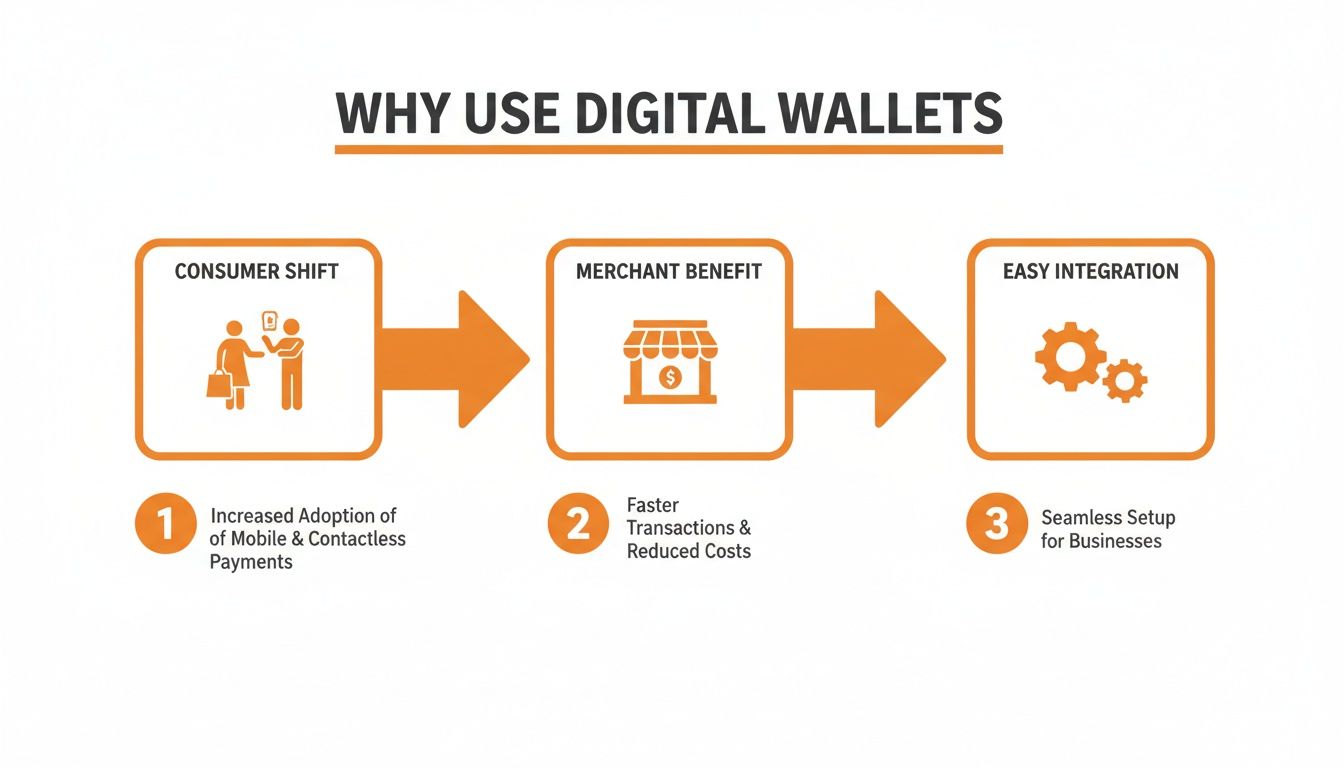
As you can see, the shift to digital wallets is a direct response to consumer behavior, and it creates a win-win scenario for merchants through simple, powerful integrations.
Setting up these rules in a platform like Toki is usually just a matter of filling out a few forms. The system then takes over, automatically applying the rules and making sure every customer’s pass is always up to date. No manual tracking required.
Customizing the Pass with Your Branding
Once the program logic is sorted, it's time to make it look good. Think of your Apple Wallet pass as a digital extension of your brand. It needs to be instantly recognizable and feel like it belongs to your store every time a customer opens their wallet.
A well-designed pass feels less like a coupon and more like a premium membership card.
You'll get to customize several key visual elements:
- Logo: This is front and center, sitting at the top left of the pass. Use a clean, high-resolution version for a professional look.
- Cover Image: Often called a "strip" or "hero" image, this graphic spans the top of the pass. It's the perfect spot for a lifestyle photo or branded graphic that captures your store's personality.
- Colors: You can set the background and text colors to match your brand palette perfectly. Just make sure there's enough contrast for everything to be easily readable.
- Icon: This tiny icon shows up in lock screen notifications and in the main wallet list. It should be a simple, recognizable version of your logo.
These aren't just cosmetic tweaks. They build brand consistency and make the experience feel premium, which encourages customers to actually keep and use the pass.
Key Takeaway: Think of your loyalty pass as a mini-billboard for your brand. A professional, on-brand design builds trust and makes customers proud to have it in their digital wallet.
Configuring Your Pass Information Fields
The final piece of the puzzle is setting up the dynamic information that appears on the pass itself. This is what transforms it from a static image into a living, personalized tool for each customer.
You want to display the most critical info right on the front.
Common fields include:
- Customer Name: A simple touch that makes the card feel personal and exclusive.
- Points Balance: This is the big one. It needs to be front-and-center and always updated in real time.
- Membership Tier: Clearly shows a customer's status (e.g., "Gold Member"), reinforcing their value.
- QR Code or Barcode: This is the functional heart of the pass, making it easy to scan at your point-of-sale system.
Don't forget about the "back" of the pass, either. It’s valuable real estate where you can add links to your website, customer service info, or a quick summary of your program's terms. This keeps the front of the card clean while still providing helpful resources.
The real magic here is the automatic updates. When a customer buys something, your loyalty platform instantly pushes the new point total to their pass. This immediate feedback is incredibly satisfying for the customer and constantly reinforces the value of being loyal. This dynamic interaction is why converting traditional loyalty programs to Apple Wallet can show a 50–92% increase in customer engagement. You can learn more about the financial impact of Apple Wallet passes and see how it can boost your bottom line.
With all this done, your pass is officially ready to be shared with the world.
Designing a Pass Customers Actually Want to Use
Let's be honest, a loyalty pass is more than just a digital coupon. It's a little piece of your brand that lives on a customer's phone—their most personal device. Just making a pass that works isn't enough. To earn a spot in a crowded Apple Wallet and actually get used, your design needs to be sharp, intuitive, and genuinely useful.
Think of it this way: a cluttered, generic pass tells your customers you don't sweat the details. But a clean, beautifully branded card? That feels like a real perk. It’s something people are happy to have and, more importantly, remember to use. The whole point is to create something that feels so natural it becomes a reflex during their shopping routine.
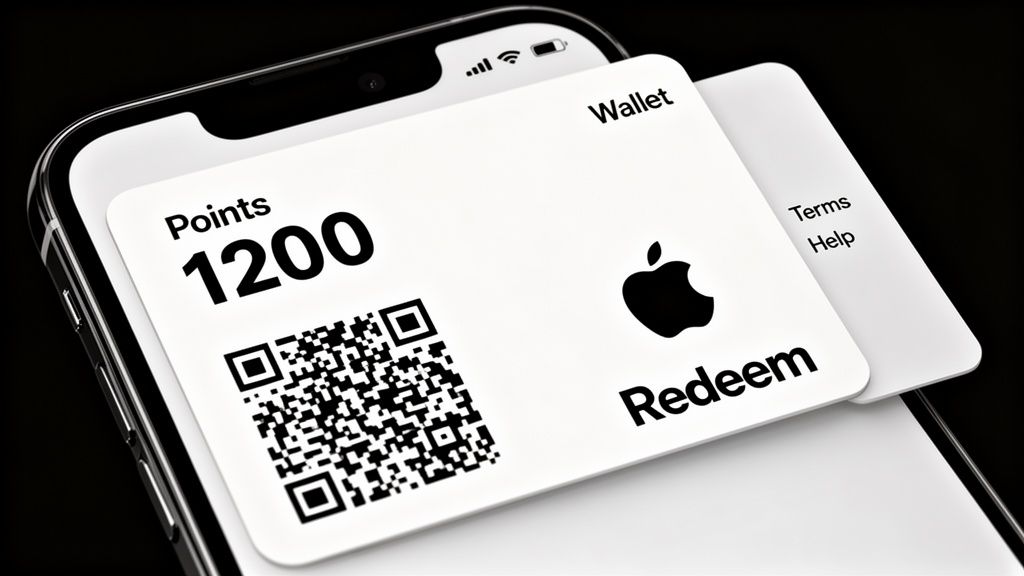
So, we're moving past the technical bits and getting into the art of good pass design. We'll break down the choices that boost readability, strengthen your brand, and get your best customers to engage more often.
Prioritize Information Hierarchy
When a customer pulls up your pass at the checkout counter, they're under pressure and looking for one or two things. Your design needs to serve up that information instantly, with zero friction. That's where a smart visual hierarchy makes all the difference.
The most crucial data should be the most obvious. For pretty much every loyalty program, that means two things: the current points balance and the QR code or barcode for scanning. These are the action items, the things a customer needs right now. Make them big, bold, and impossible to miss.
A great little test I always recommend is the "five-second rule." If someone can't figure out the card's main purpose and find their points in under five seconds, the design is too complicated. Go back to the drawing board.
Secondary details, like a membership ID number or a link to your store, can have less visual weight. Better yet, tuck them away on the back of the pass. The front is your prime real estate; don't waste it.
Nail Your Brand's Visual Identity
Your digital pass can't feel like a generic template. It has to look and feel like a natural part of your brand ecosystem. That consistency builds trust and helps your card stand out from the sea of other passes in their Wallet.
Here’s a quick checklist to make sure your pass feels like yours:
- Logo and Icon: Your logo should be clear and prominent, usually in the top left. Don't forget to upload a separate, high-quality icon—that's what people see in their lock screen notifications.
- Color Palette: Stick to your brand’s primary and secondary colors. The most important thing here is contrast. Light gray text on an off-white background is a classic design mistake that makes a pass completely unreadable in a brightly lit store.
- Cover Image: The "strip" image across the top is your spot to add some flair. A great lifestyle photo, a cool branded graphic, or even a simple pattern that matches your store's vibe can work wonders.
Leverage the Back of the Pass
The "back" of an Apple Wallet pass is probably its most overlooked feature. While the front needs to be clean and focused on the transaction, the back is the perfect spot for all the extra stuff. This keeps the main view uncluttered while still providing a ton of value.
Think of it as a mini-FAQ or resource hub for your program.
Smart Uses for the Back of the Pass:
- Helpful Links: Add direct links to your website, a customer support portal, or a landing page explaining how the loyalty program works.
- Contact Information: Pop in a customer service number or email so people can get help easily.
- Terms and Conditions: A link to the full T&Cs is a must for transparency.
- Store Locator: If you have physical locations, linking to a map is incredibly useful for customers on the go.
By strategically moving these details to the back, you make the front far more effective. This is a small but critical part of learning how to add loyalty cards to Apple Wallet in a way that actually improves the customer experience and keeps them coming back.
Getting Your Loyalty Pass into Customers' Wallets
You’ve designed a slick, on-brand digital pass and it’s ready to go. Now for the most important part: actually getting it into your customers’ hands. After all, a brilliant pass is useless if nobody has it. The real goal is to make grabbing that pass feel like a completely natural part of their shopping journey.
Think about all the moments a customer interacts with your brand. Those are your golden opportunities. Instead of some big, disruptive announcement, you can weave the pass into the touchpoints they already use. It's not about forcing an install; it's about offering a convenient upgrade right when it makes the most sense.
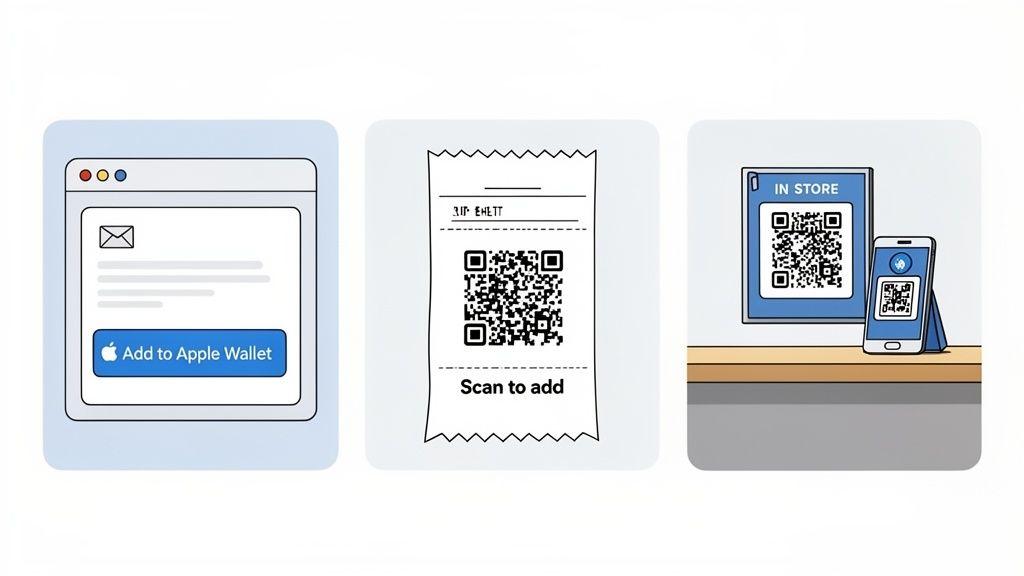
Honestly, this is way simpler than you might think. With the right strategy, you can get fantastic adoption rates without ever annoying your customers, turning your loyalty program into a genuinely powerful channel for communication.
Ride the Post-Purchase Wave
One of the absolute best times to offer the loyalty pass is right after a customer makes a purchase. They’re already engaged, they just committed to your brand, and that little bit of "new purchase excitement" is kicking in. This is the perfect window to present a simple, high-value offer.
- On the Order Confirmation Page: Don't just settle for a generic "Thank You" screen. Add a big, can't-miss button that says something like, "Add Your Loyalty Card to Apple Wallet & Get 50 Points!" It gives them an instant reward and captures them at their peak level of engagement.
- In Post-Purchase Emails: Your order and shipping confirmation emails get some of the highest open rates you'll ever see. Dropping a clear "Add to Apple Wallet" link in there is a no-brainer. You can frame it as a handy way for them to track the points and rewards from the purchase they just made.
This whole flow can be automated. For instance, a platform like Toki can generate a customer's unique pass the moment they check out and pop the installation link right into your Shopify confirmation emails. It’s totally seamless for you and your customer.
Make It a Feature of Their Customer Account
Your most loyal customers are probably the ones who have bothered to create an account on your website. This is your core group of engaged shoppers, which makes their account page prime real estate for promoting your digital pass.
Instead of burying the option in a settings menu, give it a dedicated section. A simple banner or call-to-action that reads, "Tired of missing points? Add our loyalty card to your Apple Wallet for easy access" works wonders. Since they're already logged in, the system knows who they are, making the whole process a one-click affair.
Pro Tip: Position the digital pass as a perk for account holders. This adds another layer of value to having an account and gives people one more reason to stay logged into your brand's world.
Bridge the Physical and Digital Worlds with QR Codes
If you have a physical store, QR codes are your best friend. They create a frictionless bridge between your in-store experience and your digital loyalty program. The trick is to place them in highly visible spots where customers are already looking or waiting.
Imagine a customer at your coffee shop. While waiting for their latte, they see a small sign on the counter with a QR code and a simple message: "Scan to join our rewards club and get your next coffee free." One quick scan and they’re taken directly to their personalized Apple Wallet pass, ready to install.
Great Places to Use QR Codes:
- On physical receipts: An easy addition to the bottom of every receipt.
- In-store signage: Place them near the checkout counter, on tabletop displays, or in fitting rooms.
- Product packaging: Include a small card with a QR code inside the box.
- Window clings: A big QR code on your front window can catch the eye of people just walking by.
This strategy is a cornerstone of effective digital wallet marketing, as it grabs customer interest at the very moment they are physically engaging with you.
Loyalty Pass Distribution Channel Comparison
Choosing the right distribution channels is key to maximizing adoption. Some methods offer quick wins, while others are better for long-term, steady growth. This table breaks down the most common options to help you decide where to focus your efforts.
| Distribution Channel | Effectiveness | Implementation Effort | Best For |
|---|---|---|---|
| Post-Purchase Emails | High | Low | Capturing every new and returning online customer with minimal setup. |
| Order Confirmation Page | Very High | Low | Capitalizing on peak customer excitement immediately after a sale. |
| In-Store QR Codes | High | Medium | Bridging the physical-digital gap and signing up in-person shoppers. |
| Customer Account Portal | Medium | Low | Engaging your most loyal, logged-in customer base. |
| SMS & Email Campaigns | Medium-High | Medium | Re-engaging existing customers and announcing the program to your list. |
| Social Media Ads/Posts | Varies | High | Broad awareness campaigns and targeting specific customer segments. |
Ultimately, a multi-channel approach works best. By combining a few of these methods, you create numerous easy paths for customers to join your program, ensuring no one gets left behind.
Run a Targeted Digital Campaign
Beyond your own website and store, you can proactively reach out to existing customers and subscribers with targeted campaigns. This is a great way to re-engage people who haven't shopped in a while and make sure your whole customer base knows about your new loyalty program.
- SMS Campaigns: Send a text to your subscriber list with a direct link to install the pass. Something simple like, "Great news! Our new loyalty card is here. Add it to your Apple Wallet now and get 100 bonus points" is direct and effective.
- Social Media: Run a small campaign on Instagram or Facebook targeting your followers. You can use the "link in bio" or a swipe-up feature in your Stories to send them to a landing page where they can sign up and get their pass.
By mixing and matching these strategies, you create a web of opportunities for customers to join. This approach ensures you’re reaching everyone, from the first-time online buyer to the loyal in-store regular.
Keeping Customers in the Loop with Notifications and Updates
Once a customer tucks your loyalty pass into their Apple Wallet, you've done more than just digitize a piece of plastic. You've opened up a direct line of communication right to their lock screen. This is where the real magic happens, turning a static card into a living, breathing part of your brand experience.
Think about that for a second. A customer makes a purchase, and before they’ve even left the counter, their points balance updates right on the pass. A little notification pops up celebrating their new total. That kind of instant gratification is powerful—it makes the whole loyalty program feel tangible and rewarding in the moment.
It’s about more than just numbers, though. It’s your chance to send timely, relevant messages that actually get customers to come back.
Using Push Notifications to Stay Top-of-Mind
Push notifications are the secret sauce for any good Wallet pass strategy. Here’s the thing: people get tired of app notifications and often switch them off. But Wallet notifications? They’re on by default the second someone installs your pass. That gives you an incredible, high-engagement channel to your most valuable customers.
The trick is to use it well. Don't spam them. Instead, send targeted messages that feel helpful and exclusive.
Imagine sending out a quick note like:
- "Heads up! You're just 50 points away from your next reward. Swing by to claim it!"
- "Our new seasonal collection just landed. Flash this pass for an exclusive first look."
- "Happy Birthday, Sarah! We just dropped 100 bonus points into your account to celebrate."
This kind of personal touch makes your marketing feel less like a megaphone and more like a friendly conversation. You're creating little moments of delight that build genuine loyalty. For a deeper dive into crafting messages that work, checking out some actionable push notification best practices can give you a ton of great ideas.
Getting Hyper-Relevant with Location-Based Offers
This is where things get really smart. You can set up geo-fenced or beacon-triggered alerts that bring your pass to life based on a customer's physical location. By drawing a virtual circle around your stores, you can have Apple Wallet automatically show the loyalty pass on a customer’s lock screen when they’re nearby.
It's basically a digital tap on the shoulder.
Pair that with a notification, and you’ve got a seriously compelling offer. A customer walking past your coffee shop could get a ping saying, "Welcome back! Show your pass for a free pastry with your coffee today."
It just works. Why? Because it’s:
- Timely: The offer hits when they can actually use it.
- Contextual: It’s directly related to where they are, so it feels helpful, not creepy.
- Effortless: The pass is right there on their lock screen. No digging through apps.
This is what separates a simple digital card from a truly intelligent one. You can learn more about how wallet passes transform customer engagement and what it can mean for your bottom line.
Driving Action with On-the-Fly Pass Updates
Beyond just points, you can update almost any part of the pass in real-time. This opens up a ton of creative ways to run campaigns and build a little excitement or urgency.
For instance, you could change a field on the pass to feature a "Deal of the Week." Or maybe you swap out the main image to promote a big seasonal sale. When you couple these visual changes with a quick push notification, your customers know what's new without ever having to open an email or browse your site.
Keeping the pass dynamic like this makes your loyalty program feel fresh and keeps people coming back to see what's new.
Got Questions About Apple Wallet Loyalty Cards?
Jumping into something new always comes with a few questions. When it comes to digital loyalty cards, I've found that most store owners have the same handful of concerns—usually about the tech, what the customer actually sees, and if it's practical for their business.
Let's clear the air and walk through the common questions that pop up when you're looking into how to add loyalty cards to Apple Wallet for your customers.
Do I Really Need an Apple Developer Account?
This is the big one. It's often the first thing people ask, and for good reason—it sounds complicated. The short answer? No, not if you use the right platform.
A few years back, you absolutely did need your own Apple Developer account. This meant paying an annual fee and dealing with a pretty technical setup to get the right certificates. Thankfully, those days are over. Modern loyalty platforms like Toki handle all that heavy lifting for you. They manage the developer certificates and the entire technical signing process in the background.
You never have to see it or touch it. This is a game-changer because it completely removes that barrier, letting you skip the headaches and get straight to designing a loyalty program your customers will love.
How Do the Loyalty Points Actually Get Updated on the Card?
The magic of a digital pass is that it's a living thing, not just a static image. Updates are pushed out automatically, making the whole experience feel seamless for the customer.
Here’s how it works: when a customer earns points from a purchase, your e-commerce platform (like Shopify) instantly tells your loyalty app. The app then sends a secure push update straight to that customer's specific pass in their Apple Wallet.
Most of the time, the customer gets a little notification on their lock screen, and the points balance on the card is updated before they've even put their phone away. They don't have to lift a finger. That instant feedback is incredibly powerful—it reinforces the value of their loyalty right then and there.
Can Customers Use This Digital Card in My Physical Store?
Absolutely. This is one of the best parts, as it connects your online and brick-and-mortar experiences into one cohesive system.
The front of the digital loyalty pass is designed with a scannable barcode or QR code.
The process at the checkout counter is quick and simple:
- The customer opens their Apple Wallet and taps on your store's loyalty card.
- They show the barcode or QR code on their screen.
- Your point-of-sale (POS) system scans it.
That scan pulls up their customer profile just like a plastic card would, letting you apply their points or rewards to the purchase. It's the kind of fast, modern experience people now expect.
What Happens if a Customer Doesn't Have an iPhone?
Great question. While we're focusing on Apple Wallet here, a good loyalty platform is built for everyone. Most services that create Apple Wallet passes will automatically generate a compatible version for Google Wallet (what used to be Google Pay) at the same time.
When someone clicks your sign-up link, the system is smart enough to see what kind of phone they're using.
- iPhone users get sent to the Apple Wallet pass.
- Android users are seamlessly guided to add the pass to their Google Wallet.
This way, you're not leaving anyone out. You can offer a polished, digital loyalty experience to your entire customer base, no matter which phone is in their pocket.
Ready to bring your loyalty program into your customers' hands? With Toki, you can design, send, and manage stunning Apple and Google Wallet passes directly from your Shopify store. Stop getting lost in a crowded physical wallet and put your brand right on your customers' lock screens. Explore what Toki can do for your brand today.