A Developer's Guide to Shopify Functions
Unlock custom backend logic with Shopify Functions. Learn how they work, why they're fast, and how to build powerful customizations for discounts and shipping.
Shopify Functions are a seriously powerful tool for developers, giving you the ability to write custom backend logic for things like discounts, shipping rates, and payment options. Basically, they let you deploy your own code to run directly on Shopify’s global infrastructure, which means you get native performance and rock-solid security for even the most complex e-commerce rules.
What Are Shopify Functions
Let's use an analogy. Imagine you want to add a custom feature to your store's checkout. In the past, this was like hiring a contractor who worked out of a workshop across town. Every time a customer needed your special feature, your app (the contractor) had to make a round trip from its server (the workshop) to your Shopify store. This back-and-forth communication over APIs could create delays and introduce potential points of failure, especially during a flash sale.
Shopify Functions completely flip that model on its head. Now, it’s like having an expert contractor already inside your house, ready to work. Your custom code runs directly within Shopify's environment, right at the source. This "on-site" expert can instantly apply a complex discount or validate a shipping address without ever making an external call. The result? Your logic executes in milliseconds.
The Core Advantage: Speed and Security
This "on-site" execution is a genuine game-changer. By cutting out the network latency that comes with traditional API-based apps, you deliver a much faster and more reliable checkout experience for your customers.
Shopify Functions are built to execute in under 5 milliseconds. This raw speed ensures your store can handle massive traffic spikes—think Black Friday—without a single hiccup, protecting your conversion rates when it matters most.
On top of that, Functions run in a secure sandbox. This means your code is completely isolated and can't interfere with the rest of the Shopify platform, giving you a level of stability and security that was tough to achieve with older backend customization methods.
The image below gives a great visual breakdown of how Functions stack up against older methods like Liquid, especially when it comes to performance and flexibility.
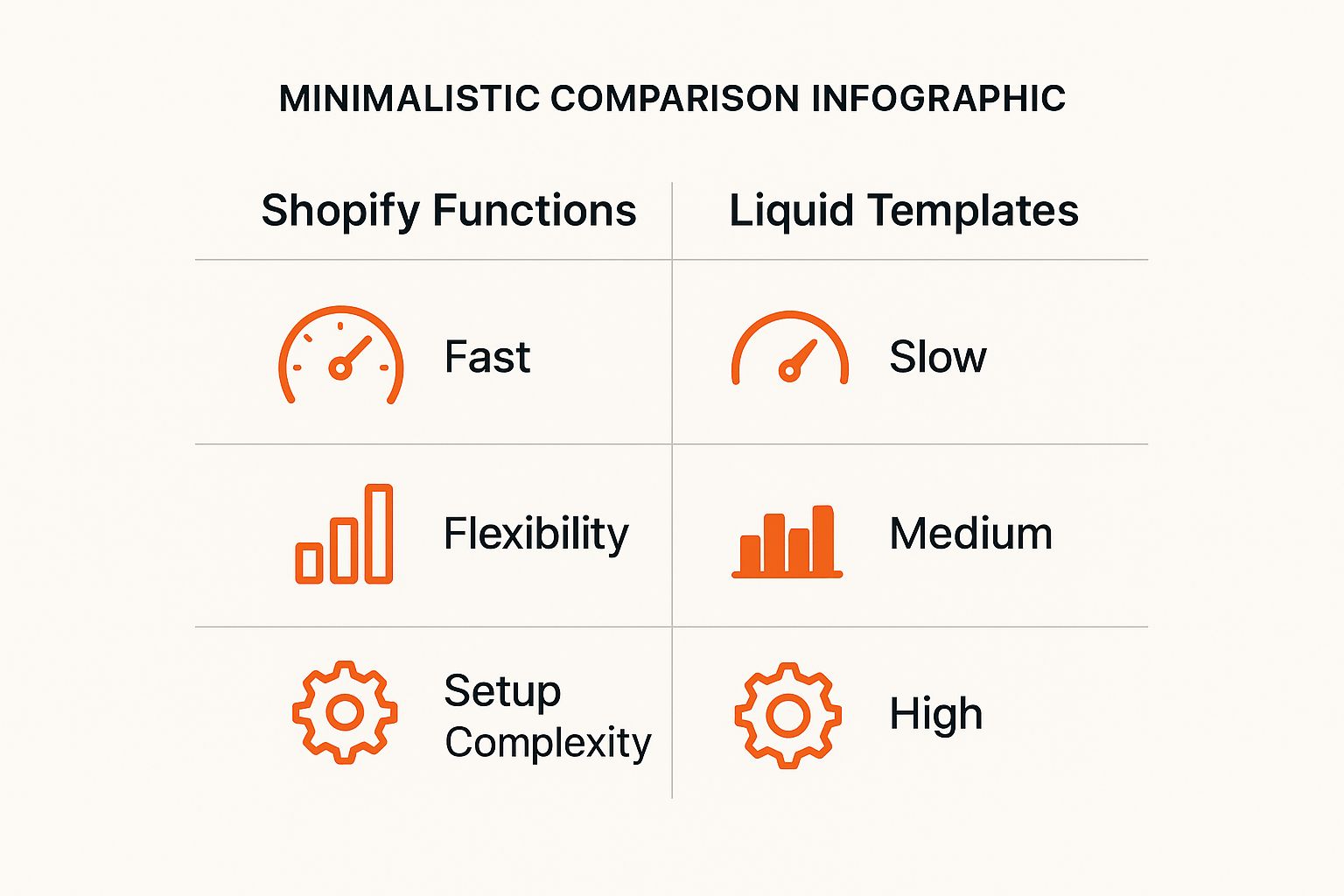
As you can see, while there's a bit of a learning curve, the payoff in speed and flexibility for backend logic is massive.
Shopify Functions vs Traditional App Logic
To really drive the point home, let's look at a quick side-by-side comparison of how Shopify Functions differ from the traditional way apps handled custom logic.
| Attribute | Shopify Functions | Traditional Apps |
|---|---|---|
| Execution Environment | Runs directly on Shopify's servers | Runs on an external, third-party server |
| Performance | Extremely fast (under 5ms) | Slower due to network latency (API calls) |
| Scalability | Scales automatically with Shopify's infrastructure | Developer is responsible for scaling their own server |
| Security | Isolated in a secure sandbox | Potential security risks with data transfer |
| Checkout Impact | Seamless, no added checkout delays | Can slow down the checkout process |
The table makes it pretty clear: Shopify Functions are built from the ground up for performance and reliability right where it counts—at the core of your e-commerce engine.
How Shopify Functions Work Under the Hood
To really get what makes Shopify Functions so special, we need to pop the hood and see what's powering them. The secret sauce here is WebAssembly, or Wasm for short. This isn't just another programming language; it's a super-fast, universal format for code that runs pretty much anywhere.
Think of Wasm as a secure, portable shipping container for your logic. You can write your code in a language like Rust, and the compiler packs it into a standardized Wasm container. Shopify's global infrastructure can then run this container instantly. It's incredibly fast, safe, and ridiculously efficient.
This "container" approach is exactly why your custom code can run right alongside Shopify's core checkout processes without ever causing trouble.
The Execution Lifecycle Explained
So, how does a piece of code you wrote on your laptop end up running at checkout in the blink of an eye? The journey is actually quite direct, built from the ground up for speed and reliability.
It all begins in your local development setup. You use the Shopify CLI to build and bundle your function. Once you deploy it, Shopify takes that Wasm module and distributes it across its servers worldwide, keeping it ready and waiting.
Here's the play-by-play when a customer's action calls your function into action:
- Trigger Event: A customer hits a specific point in their journey, like getting to the shipping selection page during checkout.
- Shopify Sends Input: Shopify's backend immediately grabs all the necessary context—what's in the cart, who the customer is, where it's shipping—and sends it to your Wasm module as a clean JSON input.
- Your Logic Executes: Inside the secure Wasm environment, your function wakes up. It reads the input data, runs your custom rules (maybe hiding a shipping option or calculating a special discount), and figures out what to do next.
- Function Returns Output: Your function sends its decision back to Shopify, again in a specific JSON format. This entire round-trip is lightning fast, often completed in under 5 milliseconds, so the customer never feels a thing.

To appreciate how this all works so seamlessly, it helps to have a good grasp of understanding Application Programming Interfaces (APIs), as they are the foundation for this kind of structured communication.
The Input and Output Contract
The whole conversation between Shopify and your function relies on a simple, unbreakable rule: a strict input and output contract. Your function is basically a black box. It receives a predictable input and is expected to return an equally predictable output.
This input/output model is the key to their incredible reliability. Because a Shopify Function can't make external network calls or hit a database, its behavior is 100% determined by the data Shopify gives it. That makes Functions predictable, secure, and dead simple to test.
Let's say you're building a shipping customization. Your function gets a JSON payload detailing everything in the cart. Its one job is to process that information and return a JSON object with instructions, like { "hide": [{ "deliveryOptionHandle": "standard-shipping" }] }.
This clear-cut contract is what ensures everything works together perfectly, making your custom code feel like a native part of the Shopify platform.
Solving Real Problems with Customization APIs
This is where the rubber meets the road. The real magic of Shopify Functions isn't in the technical diagrams; it's in how they solve tangible business problems. These backend customizations are precision tools for building the exact e-commerce experiences merchants dream up but can't quite pull off with out-of-the-box settings.
For developers, this is where we create serious value—turning complex business logic into smooth, customer-facing features.
The Shopify ecosystem is massive. We're talking over 4.6 million active websites worldwide, with every merchant trying to stand out from the crowd. In a market like the United States, where Shopify commands 29% of the market share, differentiation is everything. Functions provide that deep level of customization needed to carve out a unique niche.
So, how does it actually work? This level of control is made possible through specific APIs designed to intercept and tweak core Shopify processes as they happen.
Supercharging Discounts with Custom Logic
Standard Shopify discounts are fine, but they hit a wall pretty quickly. What happens when a merchant wants to run a promotion that's more creative than a simple percentage off or a basic BOGO?
Let’s say a high-end apparel brand wants to offer a very specific deal: "Buy any two items from our 'Luxe Collection,' and get a free 'Essential Tee.'" This is simply impossible with default Shopify rules.
But with the Discount API, a Shopify Function can jump in and:
- Scan the cart's contents in real time.
- Check for items tagged with "Luxe Collection" and count them.
- If the count is two or more, it finds the "Essential Tee" in the cart and instantly applies a 100% discount to it.
Suddenly, you've created a slick upselling opportunity that feels completely native to the checkout. This kind of targeted promotion is a fantastic tool for customer retention and can be a cornerstone of a great https://www.buildwithtoki.com/integrations/shopify-loyalty-program.
Fine-Tuning Shipping and Delivery Options
Shipping is another area that's begging for customization. Merchants constantly deal with unique fulfillment headaches that a one-size-fits-all shipping table just can't handle.
With the Shipping Customization API, you can rename, reorder, or completely hide shipping rates based on what’s in the cart, customer tags, or where the order is going. It gives you incredible control over what options your customers see at checkout.
A perfect example is a furniture store trying to stop customers from selecting "Standard Post" for a nine-foot sofa. A Shopify Function can spot products tagged as "oversized" and automatically hide any shipping options that don't make sense. This prevents expensive fulfillment mistakes and saves everyone a lot of headaches. Getting this right is critical, as many common pitfalls in Shopify tracking stem from these kinds of mismatches between what the system allows and what's possible in reality.
Customizing Payment Gateways
The same logic extends to the final step: payments. The Payment Customization API lets you apply intelligent rules to the payment methods shown to a customer.
This opens up a ton of possibilities:
- Offer specific payment options: You could show an "Invoice Me" option, but only for customers tagged as "Wholesale."
- Hide gateways: For subscription or pre-order products, you might need to hide certain payment methods to ensure everything processes correctly.
This API ensures the final click of the checkout is just as smart and tailored as the rest of the shopping journey, which helps reduce friction and push conversion rates higher.
To give you a clearer picture, here’s a quick rundown of what these APIs can do.
Shopify Functions API Capabilities at a Glance
This table summarizes the primary Function APIs and the powerful custom logic they enable for developers.
| API Type | Common Use Cases | Example Logic |
|---|---|---|
| Product Discounts API | Tiered discounts, BOGO, free gifts with purchase, order-level promotions | "Buy 2 sweaters, get 1 scarf at 50% off." |
| Shipping Discounts API | Free shipping over a certain threshold, discounted rates for VIP customers | "Spend over $100 and unlock free standard shipping." |
| Shipping Customization API | Hide/show/reorder shipping rates, add surcharges for oversized items | "If a product tagged 'fragile' is in the cart, hide all non-insured shipping options." |
| Payment Customization API | Hide/show/reorder payment gateways based on cart contents or customer data | "For B2B customers, show the 'Pay by Invoice' option at checkout." |
| Cart & Checkout Validation API | Enforce cart rules, limit quantities, validate custom fields, prevent checkout | "Limit customers to purchasing a maximum of 2 units of the 'Limited Edition' product." |
| Order Routing API | Route orders to specific fulfillment locations based on stock or delivery address | "If the delivery ZIP code is in California, fulfill the order from the Los Angeles warehouse." |
These APIs are the building blocks for creating truly unique and effective commerce experiences on Shopify.
Building Your First Shopify Function

Theory is great, but there's no substitute for getting your hands dirty. The best way to really wrap your head around Shopify Functions is to build one. So, let's walk through creating your first function from scratch. We’ll tackle a common e-commerce scenario that vanilla Shopify settings just can’t handle on their own.
Our mission is simple but incredibly useful: we're going to create a product discount that automatically applies 10% off any item in the cart that has a specific tag, like "sale-item". This little project will take us through setting up your dev environment, writing the core logic in Rust, and testing it all locally before pushing it live.
Setting Up Your Development Environment
Before we can even think about writing code, we need to get our workshop in order. A solid development environment is the foundation for everything that follows. For building Shopify Functions, you really only need two essential tools: the Shopify CLI and the Rust toolchain.
- Install the Shopify CLI: Think of this as your command center for all things Shopify development. It lets you generate starter code, run your function locally for testing, and eventually deploy it to a store.
- Install the Rust Toolchain: Shopify Functions are written in Rust for a good reason—it compiles down to WebAssembly (Wasm), which guarantees blazing-fast performance and rock-solid security. You'll need to install Rust and its package manager, Cargo.
- Add the Wasm Target: The final piece of the puzzle is telling Rust to compile your code for the Wasm environment. You do this by adding the
wasm32-wasitarget.
Once those tools are installed and ready to go, the Shopify CLI makes the next step a breeze. A single command generates a starter app with all the boilerplate files and configurations you need, so you can jump straight into the fun part.
Crafting the Discount Logic in Rust
With your environment ready, the CLI will have created a starter Rust project for you. Dive into the src directory, and you'll find a main.rs file—this is where the magic happens. We're about to implement our custom discount logic right here.
At its core, the function receives a chunk of data (the input) from Shopify, does something with it, and then sends back a structured set of instructions (the output). Let's break down the logic for our tag-based discount.
use shopify_function::prelude::*;
use shopify_function::Result;

use serde::{Deserialize, Serialize};

// 1. Define the input structure from Shopify
#[derive(Deserialize, Serialize, Default, PartialEq)]
#[serde(rename_all = "camelCase")]
struct Input {
    pub cart: Cart,
}

#[derive(Deserialize, Serialize, Default, PartialEq)]
#[serde(rename_all = "camelCase")]
struct Cart {
    pub lines: Vec<CartLine>,
}

#[derive(Deserialize, Serialize, Default, PartialEq)]
#[serde(rename_all = "camelCase")]
struct CartLine {
    pub merchandise: Merchandise,
}

#[derive(Deserialize, Serialize, Default, PartialEq)]
#[serde(rename_all = "camelCase")]
struct Merchandise {
    #[serde(rename = "product")]
    pub product: Product,
}

#[derive(Deserialize, Serialize, Default, PartialEq)]
#[serde(rename_all = "camelCase")]
struct Product {
    pub has_any_tag: bool,
}

// 2. Define the output structure to send back
#[derive(Serialize, Deserialize, Default, PartialEq)]
#[serde(rename_all = "camelCase")]
pub struct Output {
    pub discount_application_strategy: String,
    pub discounts: Vec<Discount>,
}
// (Additional structs for Discount, Target, Value would be here)

// 3. The main function where the logic runs
#[shopify_function]
fn function(input: input::ResponseData) -> Result<output::ResponseData> {
    let targets = input.cart.lines
        .iter()
        // Check if the product in the cart line has the target tag
        .filter(|line| line.merchandise.product.has_any_tag)
        .map(|line| output::Target {
            product_variant: Some(output::ProductVariantTarget {
                id: line.merchandise.id.clone(),
                quantity: None,
            }),
        })
        .collect::<Vec<output::Target>>();

    // If no items have the tag, return no discounts
    if targets.is_empty() {
        return Ok(output::ResponseData {
            discounts: vec![],
        });
    }

    // Apply a 10% discount to the targeted items
    Ok(output::ResponseData {
        discounts: vec![output::Discount {
            message: Some("10% off sale items!".to_string()),
            targets,
            value: output::Value {
                percentage: Some(output::Percentage {
                    value: "10.0".to_string(),
                }),
            },
        }],
    })
}
This code is incredibly specific. It defines the exact data structure it expects from Shopify, iterates through each line item in the cart to check for our "sale-item" tag, and then builds a new discount operation to send back to the checkout.
Local Testing and Deployment
Okay, the logic is written. Now what? Before this code goes anywhere near a live store, we need to test it. This is where the Shopify CLI really shines.
You can run your function locally and feed it a mock cart to see precisely how it behaves. This tight feedback loop is absolutely critical for catching bugs and tweaking your logic without risking a single live transaction. You can even connect the function to a development store to see it working in a real checkout flow. That level of granular control is vital, much like how merchants use a tool like Attentive for precise marketing automation to make sure the right message hits the right person at the right time.
Key Takeaway: The local development and testing workflow is a core strength of Shopify Functions. It allows developers to build with confidence, ensuring that custom logic is bug-free and performs as expected before it ever touches a customer's checkout experience.
Once you’re happy with how the function is performing, a simple CLI command pushes it live. Just like that, your custom discount logic is deployed and ready to run on Shopify's global infrastructure with the speed and security of a native feature.
Advanced Shipping Logic and Customizations
Shipping isn't just about moving boxes; it's a huge part of the customer experience where the little things really count. While your basic shipping rules can handle the easy stuff, Shopify Functions are what you need for the tricky, real-world fulfillment logic that can make or break a sale. This is where you graduate from simple rate tables to truly dynamic delivery options.
Let's say you sell gourmet food baskets. A standard 5-7 day shipping option is fine for crackers and jam, but it's a recipe for disaster if that basket includes fresh cheese. With a shipping customization function, your store can peek inside the cart at checkout. If it spots a product tagged "perishable," your code can instantly hide all the standard ground shipping methods, showing only "Express" or "Overnight" as available options.
This simple rule prevents a whole host of problems—from costly spoilage to unhappy customers—and helps ensure your products arrive in perfect condition. That kind of reliability is key to building trust and getting people to come back. After all, a great customer experience often leads to great reviews, which are crucial for growth. You can learn more in our guide on integrating Yotpo reviews with Shopify.
Implementing Granular Shipping Rules
Here's another real-world scenario. A local shop might want to offer free in-store pickup, but only for customers who actually live in the area. A Shopify Function can check the customer's postal code during checkout and only show the "Local Pickup" option to those within a specific radius. For everyone else, it stays hidden.
This level of control becomes incredibly important as a business grows. As Shopify's gross merchandise volume (GMV) continues to climb, the complexity of a merchant's needs grows right along with it. On a platform that processes billions in transactions, the power to fine-tune core logistics like shipping gives you a serious competitive edge.
With the Shipping Customization API, you can rename, reorder, or completely hide shipping rates based on what’s in the cart, who the customer is, or where the order is going. It gives you surgical control over what people see at checkout.
Here’s a taste of what you can build with this logic:
- Rename rates for clarity: You could change a generic "Standard International" to something more descriptive like "Standard International (7-21 Business Days)" to set clear expectations.
- Reorder options strategically: Why not always push your most popular or cost-effective shipping method to the top of the list?
- Add conditional surcharges: You can automatically apply a "Heavy Item Fee" but only when the total cart weight goes over a certain limit.
These small tweaks make a big difference. They help cut down on abandoned carts, reduce the number of shipping-related support tickets, and create a smarter, more intuitive checkout that feels like it was designed for each specific order.
Common Questions About Shopify Functions
As you start digging into Shopify Functions, a few practical questions are bound to pop up. Let's tackle the most common ones I hear from developers, clearing up any confusion around performance, language choices, and the best ways to troubleshoot your code.
Will Shopify Functions Slow Down My Store?
Not at all. In fact, they’re engineered for the exact opposite. Functions run on Shopify's own global infrastructure inside a super-optimized WebAssembly (Wasm) environment.
The magic is in the execution limit: each function has to complete its job in under 5 milliseconds. This strict cap is a built-in safety net that guarantees your custom logic will never bog down the checkout process. It's a huge leap from older apps that often relied on slower, external API calls.
The whole point of Functions is speed and reliability. By running your code directly on Shopify’s servers, you eliminate network lag. This keeps the experience snappy for your customers, even when you're getting slammed during a Black Friday sale.
So go ahead and build that complex logic—your store’s performance is safe.
Can I Use Languages Other Than Rust?
Technically, yes. The core technology is WebAssembly, which means any language that can be compiled down to a Wasm target—like C++, Go, or AssemblyScript—could work.
But here’s the real-world advice: stick with Rust. While other languages are theoretically possible, the official tooling, documentation, and community support from Shopify are all built around Rust. For any serious, production-ready app, using Rust will give you the smoothest ride and the full backing of Shopify’s developer ecosystem.
What Are the Main Limitations?
To keep them blazing fast and secure, Shopify Functions operate in a tight sandbox. This means you need to be aware of a few key constraints.
- No outside network calls: Your function can't phone home or call a third-party API.
- No database access: You can't connect to or query a database.
- Completely stateless: Functions have no memory of past runs; each execution is a fresh start.
Think of them as pure, single-purpose machines. They take a specific input from Shopify, run logic based only on that input, and spit out a structured JSON output. Their job is high-speed computation, not data storage or external communication.
How Do I Debug a Shopify Function?
Debugging is mostly a local affair, and the Shopify CLI is your best friend here. The standard workflow is to write unit tests for your Rust code to make sure the logic is sound.
From there, you can use the app function run command to feed your function mock JSON data right on your own machine. This lets you see exactly what it outputs and catch any issues before you even think about deploying.
Once your function is live, you can keep an eye on its performance and check execution logs right in the Shopify Partner Dashboard. This is your go-to for diagnosing any hiccups that might only show up in the wild.
Ready to turn casual shoppers into loyal brand advocates? Toki makes it easy to launch powerful loyalty, referral, and membership programs on Shopify. Discover how you can drive repeat sales and build a thriving community by visiting https://buildwithtoki.com.