Shopify Discount Functions A Developer Guide
Explore our complete guide to Shopify Discount Functions. Learn to build custom discounts with practical code examples for product, order, and shipping logic.
Shopify Discount Functions are essentially custom, server-side scripts that let you inject your own unique and powerful discount logic right into Shopify's checkout process. This is a game-changer because it breaks you free from the standard, out-of-the-box discount options. With Functions, you can build truly tailored promotional strategies, like complex tiered pricing, advanced "Buy X, Get Y" offers, and deals exclusive to certain customer segments.
It’s the key to unlocking discount scenarios that just weren't possible before.
An Essential Guide to Shopify Discount Functions
When Shopify rolled out its Functions API, it was a major step up for the platform's discount capabilities. It gave developers and merchants the power to break away from rigid, preset rules. Unlike standard discount codes that are stuck with simple conditions, the Functions API lets you run fully custom, server-side discount logic directly on Shopify’s own infrastructure.
This guide is your go-to reference, packed with the foundational knowledge you need to get the hang of these powerful tools.
What This Guide Covers
I’ve structured this reference to help you find what you need, fast. Whether you're a seasoned developer or just getting started with Shopify Functions, you'll find clear explanations and practical, real-world examples here. We'll dive into the different types of discount functions, their specific applications, and best practices for putting them into action.
The whole point is to give you the confidence to build sophisticated and reliable discount solutions that actually drive sales and build customer loyalty. You can even see how this fits into bigger-picture strategies, like building a custom loyalty program.
Shopify Discount Function Types at a Glance
To make navigating this guide a bit easier, the table below breaks down the main types of discount functions available. Think of it as a quick lookup tool to pinpoint the right function for your project. From there, you can jump straight to the section with the detailed syntax and code snippets you need.
It's also interesting to see how other e-commerce cart solutions like Candy Cart Pro handle their own features, as it provides a wider perspective on cart and discount logic.
| Function Type | Primary Purpose | Common Use Cases |
|---|---|---|
| Product Discounts | Apply discounts to specific items or lines in the cart. | "Buy One, Get One" (BOGO), volume-based tiers, or member-only product pricing. |
| Order Discounts | Apply discounts to the entire order subtotal. | Percentage or fixed amount off for orders exceeding a certain value. |
| Shipping Discounts | Reduce or eliminate shipping costs at checkout. | Free shipping for VIP customers or discounted rates for specific regions. |
Each of these function types opens up a different set of possibilities for crafting the perfect promotion. Now, let's get into the specifics of each one.
Getting a Handle on Shopify Functions Architecture

Before you can start building custom promotions, you really need to grasp the architecture behind Shopify discount functions. These aren't just simple scripts. Think of them as sophisticated, server-side modules that run your custom logic right inside Shopify's own checkout infrastructure. This direct integration is what makes them so fast and secure, ensuring your customers never hit a snag.
The magic behind this is WebAssembly (Wasm). Shopify uses Wasm to create a secure, sandboxed environment for your code. Essentially, your function runs in its own isolated bubble, so there’s no risk of it interfering with the checkout process or touching sensitive data. And it all happens at lightning speed. Performance is non-negotiable here; your function has to execute in under 5 milliseconds to ensure there's absolutely no delay for the shopper.
The Development and Deployment Workflow
Going from an idea to a live discount function is a well-defined process, and it all revolves around the Shopify CLI. This tool is your command center for creating, building, and deploying functions as part of a custom Shopify app. The app itself is just the vehicle that delivers your custom logic to a merchant's store.
Here’s what that workflow typically looks like:
- Scaffolding: You start by using the Shopify CLI to generate a new function extension inside your app project. You'll get to pick a template for product, order, or shipping discounts.
- Development: Next, you'll write the actual discount logic. You can use languages like Rust or JavaScript/TypeScript, though Rust is often the go-to for its performance edge, especially if you expect to handle large carts.
- Deployment: With your code written and tested, you deploy the app extension. This step compiles everything into a Wasm module and pushes it up to Shopify's global infrastructure.
- Activation: Just because it's deployed doesn't mean it's live. The function has to be activated from the Shopify admin. This involves creating a new automatic discount or discount code and then using the GraphQL Admin API to link it to the function you just deployed.
This separation is brilliant—developers focus on the logic, while merchants handle the configuration. It’s what makes Shopify discount functions so powerful yet manageable for everyone involved.
How Functions Talk to Shopify APIs
Your function communicates with Shopify's platform using GraphQL. When a customer hits checkout and your function is triggered, Shopify sends it a JSON payload. The structure of that payload is determined by an input query you define in a .graphql file, which lets you specify precisely what cart and customer data your function needs.
Your function takes this input, runs it through your custom rules, and returns a structured JSON output. This output is a clear set of instructions for Shopify, telling it exactly which discounts to apply, what items they apply to, and how much they're for.
It's important to remember that the function's logic is stateless. It has no memory of past executions and only knows about the data it receives in that one payload. This design guarantees that every checkout calculation is independent and consistent, which is crucial for a stable e-commerce platform. Getting comfortable with this input-process-output model is the key to writing effective, bug-free shopify discount functions.
How to Implement Product Discount Functions

When you need to get granular with your promotions, Product Discount Functions are the right tool for the job. They're what you'll use to apply discounts to specific items right in the customer's cart. This is different from order-level discounts, which just knock a percentage off the subtotal. Instead, these functions work on individual line items.
This gives you incredibly precise control. Think of common scenarios like "Buy One, Get One" (BOGO), tiered discounts for buying in bulk, or even special pricing for VIP customers based on their tags. This is the kind of power that Shopify Functions for products unlock. You can loop through every line in the cart, check its properties—like quantity, variant ID, or custom metafields—and then decide exactly how to apply a discount.
Understanding the Input and Output Structure
To write a solid Product Discount Function, you have to get comfortable with the data it receives and what it needs to send back. Essentially, Shopify hands your function a JSON object full of cart data, and your function's job is to process it and return a new JSON object with specific discount instructions.
Input (RunInput):
Your function's input contains everything it needs to know about the cart and the discount itself. The most important piece is the cart object, which holds an array of lines. Each line item object gives you the key details:
id: The unique ID for that specific line in the cart.quantity: How many units of the item the customer has added.merchandise: This is where you'll find product and variant details, including their IDs.cost: All the price information for that line item.
You also get a discountNode in the input. This is where you can access any metafield configuration data you've set up in the Shopify admin. It's perfect for passing in dynamic values like a discount percentage or a quantity threshold without having to hard-code them.
Output (FunctionRunResult):
Once your logic runs, your function must return a JSON object with a very specific structure. The key parts are:
discountApplicationStrategy: This tells Shopify how your discount should behave alongside others.FIRSTis a common and safe choice, meaning it applies and stops other product discounts from applying to the same item.discounts: This is an array of discount objects you've built. Each object needs to define itstargetsand the discountvalue.
Mastering this input-process-output flow is the core of building any Product Discount Function.
A Practical BOGO Code Example
Let's walk through a classic example: a "Buy One, Get One Free" offer on a specific product. Our goal is to check if a customer has at least two of a target product in their cart, and if they do, we'll make one of those items free.
First, you would set up metafields in your discount's configuration in the Shopify Admin to store the targetProductId and maybe a discountPercentage. For a BOGO, that percentage would be 100. Your function then reads those values to know what to do.
// A simplified BOGO Product Discount Function
export function run(input) {
  // Get the target product ID from the discount's metafield
  const targetProductId = input.discountNode.metafield.value;
  const discountPercentage = 100;

  // Go through the cart lines to find our target product
  const targetLine = input.cart.lines.find(line =>
    line.merchandise.product.id === targetProductId && line.quantity >= 2
  );

  // If the product isn't in the cart (or there's only one), we do nothing
  if (!targetLine) {
    return { discounts: [] };
  }

  // If we found it, it's time to build the discount
  const discount = {
    targets: [{
      productVariant: {
        id: targetLine.merchandise.id,
        // We only want to discount one of them!
        quantity: 1
      }
    }],
    value: {
      percentage: { value: discountPercentage }
    },
    message: "BOGO Offer Applied!"
  };

  // Send back the discount and the strategy
  return {
    discounts: [discount],
    discountApplicationStrategy: "FIRST"
  };
}
In this code, the function finds a line item that matches our target product and has a quantity of two or more. If it finds one, it builds a discount object that targets a single quantity of that variant and applies a 100% discount.
Addressing Common Implementation Pitfalls
While the BOGO example seems simple, things can get tricky in the real world. One of the most common snags developers hit is trying to apply multiple, overlapping discounts to different products in the same cart. For instance, you might try to create several volume discounts, only to find that just the last one that the customer qualified for gets applied. You can read more about this exact challenge in the Shopify community forums to get a feel for the edge cases.
The key to avoiding this is to make sure your logic correctly iterates through all the lines and builds a complete array of distinct discount objects—one for each qualifying item. Always test your functions with complex carts to make sure your implementation of Shopify Functions is robust and handles every scenario you expect.
How to Implement Order and Shipping Discount Functions

While Product Discount Functions are great for item-specific deals, Order and Shipping Discount Functions let you zoom out and target the bigger picture. They’re your heavy hitters for encouraging larger checkouts and tackling cart abandonment head-on by influencing the two things customers care about most: the order total and the shipping price.
Order Discount Functions apply a discount to the entire cart subtotal. Think of your classic promotions, like "10% off orders over $100" or a simple "$20 off your entire purchase." These functions work on the final subtotal, which makes them perfect for sitewide sales or tiered spending rewards.
Shipping Discount Functions, as the name suggests, deal exclusively with shipping rates. Since high shipping costs are a notorious conversion killer, these functions are a must-have in your toolkit. You can use them to offer free shipping based on a customer's location, how much they're spending, or even their loyalty status.
Crafting Order-Level Discounts
When you build an Order Discount Function, you're essentially telling Shopify to check the cart's properties against a set of rules you define. The function gets the cart subtotal as part of its input, giving you the data you need to trigger a discount when a certain amount is reached.
For instance, you could set up a function that knocks 15% off the total when the cart subtotal crosses the $150 mark. The function would simply check the value of input.cart.cost.subtotalAmount.amount. If it's $150 or more, it returns a discount object aimed right at the order subtotal.
Here’s a basic look at how that logic works:
// A simplified Order Discount Function
export function run(input) {
  const subtotal = parseFloat(input.cart.cost.subtotalAmount.amount);
  const threshold = 150.0;

  if (subtotal >= threshold) {
    return {
      discounts: [{
        targets: [{ orderSubtotal: { excludedVariantIds: [] } }],
        value: { percentage: { value: 15.0 } },
        message: "You've unlocked 15% off!"
      }]
    };
  }

  // If the threshold isn't met, return no discounts
  return { discounts: [] };
}
This kind of simple check is an incredibly effective way to motivate customers to add just one more item to their cart, giving your average order value a nice little bump.
Implementing Strategic Shipping Discounts
Shipping Discount Functions are your secret weapon for creating competitive offers that customers actually want. Your function gets access to both the proposed shipping rates and the customer's shipping address, which means you can create some highly specific rules. This is where you can build dynamic, personalized experiences that foster real loyalty. For a deeper look at how this fits into your retention strategy, check out our guide on the best ecommerce loyalty programs.
Pro Tip: A common and powerful tactic is to offer free shipping only to specific countries or regions. This can do wonders for conversion rates in key markets where shipping would otherwise be prohibitively expensive.
To make this happen, your function would look at the input.shippingAddress and run through the available input.shippingLines. From there, you just need a bit of logic to see if the address's country code matches your target (like "US" or "CA") and if a certain shipping rate is available.
If everything lines up, your function returns a discount that drops the cost of that specific shipping rate to zero. This granular control lets you build precise shipping promotions, whether it's offering free standard shipping on domestic orders over $75 or discounting express shipping for VIP customers. Getting a handle on these shopify discount functions is crucial for building a truly effective promotional strategy.
Strategies for Stacking and Combining Discounts
Going beyond a single discount is where you can unlock truly powerful promotional campaigns. The real magic happens when you learn how to combine multiple Shopify discount functions at checkout, creating layered incentives that can significantly boost your average order value (AOV) and conversion rates. This isn't just about letting discounts pile up; it's a technical strategy for making them cooperate intelligently.
The heart of this strategy is the discountApplicationStrategy property in your function's output. This property is what tells your discount how to play with others. For example, setting it to FIRST ensures that if your discount applies to a product, no other product discounts can affect that same item. This simple setting prevents customers from unintentionally double-dipping on deals.
Mastering Discount Application Logic
Controlling the order of operations is essential if you want to avoid conflicts and unexpected outcomes. You can build conditional logic directly into your functions, allowing them to check for other applied discounts before they even run. This gives you precise control to create promotions that are either intentionally stackable or mutually exclusive, depending on your campaign goals.
A classic example is combining a product-level offer, like a Buy One, Get One (BOGO), with an order-level discount, like "10% off your entire purchase." By configuring the application strategy for each function correctly, you can ensure the BOGO applies first to the relevant items. Then, the 10% discount calculates on the remaining subtotal of the cart, just as you intended.
This chart shows just how much impact different discount strategies can have on key business metrics.
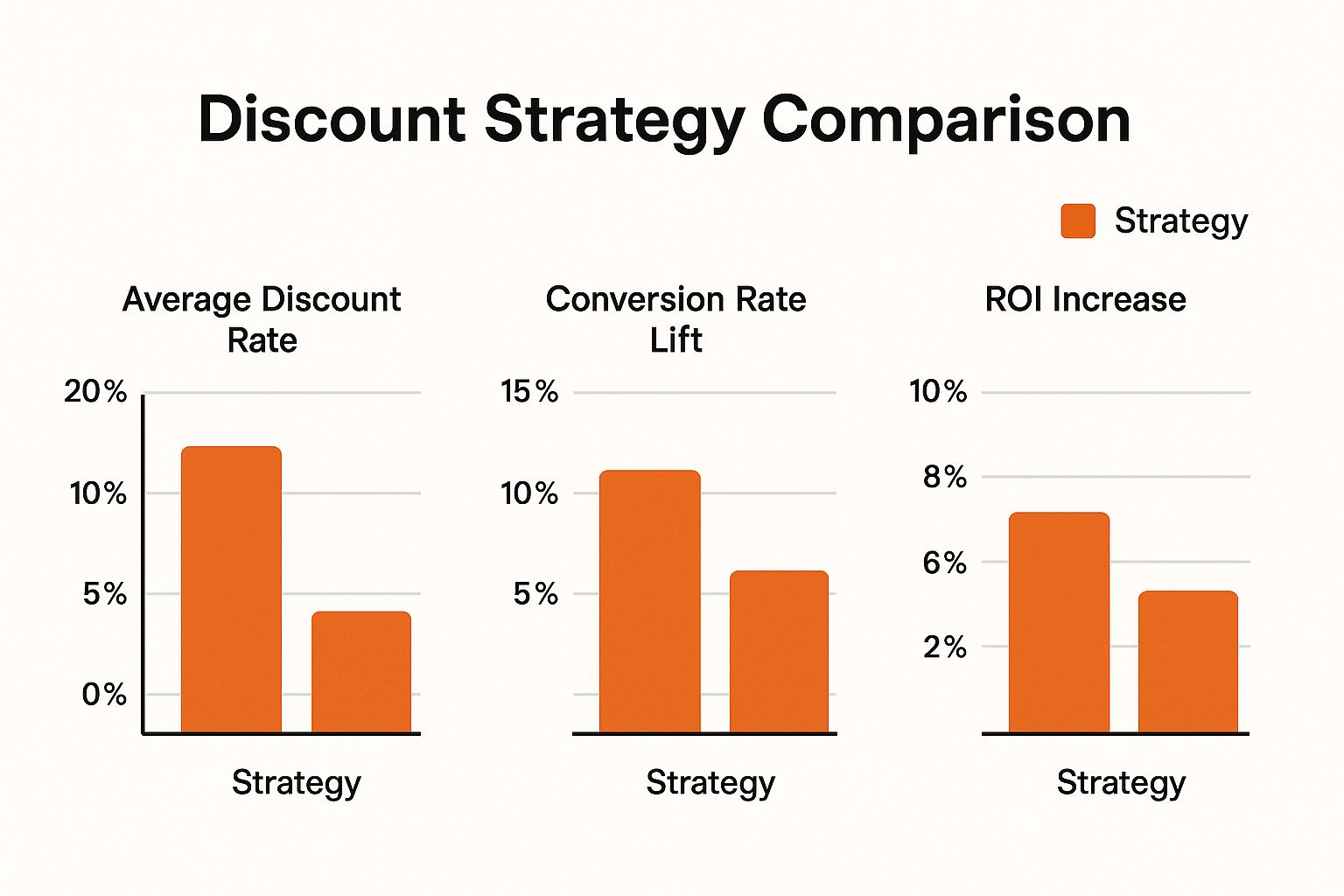
As the data shows, well-designed, combined discount strategies don't just lift conversion rates—they also deliver a much higher return on investment.
Stacking Strategy Comparison
When you're building out complex promotional campaigns, how you stack your discounts makes all the difference. The table below compares a few common strategies to help you decide which technical approach fits your needs.
| Stacking Strategy | Technical Approach | Best For | Potential Pitfalls |
|---|---|---|---|
| First Applied Wins | Use FIRST in discountApplicationStrategy. | Simple, mutually exclusive offers on the same product (e.g., "20% Off" vs. "Free Gift"). | Can prevent customers from getting a better deal if a lower-value discount applies first. |
| Layered Stacking | Use ALL and conditional logic. Functions check for existing discounts. | Complex campaigns like a BOGO offer combined with an order-level percentage off. | Requires careful coding to avoid conflicts and unexpected discount calculations. |
| Targeted Stacking | Functions are scoped to specific targets (e.g., product vs. shipping). | Applying multiple, non-overlapping discounts like "Free Shipping" and "15% Off a Specific Collection." | Less flexible if you later want discounts to interact with each other. |
| Maximum Value | Code logic to compare potential discounts and apply only the best one for the customer. | Prioritizing customer satisfaction by always giving them the best possible deal. | Can be technically complex to implement and may reduce margins if not planned carefully. |
Ultimately, the right strategy depends entirely on your campaign's logic and business goals. A well-thought-out approach ensures both a great customer experience and a profitable outcome for your store.
Building Powerful and Scalable Promotions
The ability to layer promotions this way is a major advantage. In fact, reports show that merchants using the Shopify Functions API for their discount rules saw their AOV increase by up to 15-25% compared to those who only used native features. What's more, you can combine up to 25 different discount functions at the same time, enabling incredibly sophisticated campaigns without risking checkout errors. You can find more insights on effective discount strategies and their impact online.
The key takeaway here is that stacking isn't random. It’s a deliberate, logical process. By checking the cart's state and any existing discounts, a function can decide whether to apply itself, change its value, or do nothing at all. This prevents conflicts and keeps the checkout experience smooth for the customer.
Getting these combination techniques right is a must for any developer aiming to build high-impact promotional campaigns. It takes you from simple discount codes into a world of dynamic, rule-based incentives that adapt to any cart, creating more effective and profitable sales events.
Troubleshooting Common Discount Function Errors
When you're building custom logic with Shopify Functions, you're bound to run into a few hiccups. It's just part of the process. The good news is that most problems fall into a few common buckets, so once you know what to look for, debugging becomes much more straightforward.
Most issues you'll face will be deployment failures, logic flaws that cause discounts to misbehave, or performance hits that slow down checkout. Let's break down how to tackle each one.
Deployment Failures
This is often the first hurdle. Your function works perfectly on your local machine, but it just won't deploy to Shopify's servers. Nine times out of ten, this points to an issue with your local environment or the shopify.function.extension.toml configuration file.
Before you start pulling your hair out, double-check that your Shopify CLI is fully updated. Then, take a close look at your .toml file to make sure the API version and any specified capabilities are correct. A simple typo here is a very common culprit.
Diagnosing Logic and Performance Issues
What if your function deploys successfully but doesn't actually work as intended at checkout? Maybe your BOGO offer discounts the cheaper item instead of the correct one, or a complex tiered discount fails to trigger at the right cart value. This is a classic logic error.
Another common problem is performance. Your function might be doing too much work, especially when iterating over a large cart with many line items. If it takes too long to run—typically over 5 milliseconds—Shopify will time it out to keep the checkout experience fast for the customer.
To get to the bottom of these issues, your best friends are logs and tests.
- Shopify Logs: The single best tool in your arsenal. Run your app locally using the
shopify app devcommand. This gives you a live feed of what's happening, showing the exact input your function receives from Shopify and the output it generates. It’s the fastest way to see why your logic is going off the rails. - Unit Testing: Don't skip this. Before you even think about deploying, write solid unit tests. Create mock input data that covers every scenario you can think of: empty carts, carts that almost qualify, carts with multiple qualifying items, and any other edge cases specific to your discount. This is crucial for verifying your logic and spotting performance bottlenecks early.
A critical thing to remember is that a function is stateless. It operates in a vacuum and only knows about the data it receives in its input payload. If you need customer tags or product metafields, but you forgot to include them in your input GraphQL query, your function won't see them. It's a simple mistake that can lead to a lot of confusion.
By making logging and thorough testing part of your standard workflow, you'll build far more resilient and reliable Shopify discount functions. Of course, building the discount is only half the battle. You also need to know if it's actually working for your business. For more on that, you can learn how to measure the success of a loyalty program and apply those principles to your promotions.
Discount Functions FAQ
When you're diving into the world of Shopify discount functions, a few common questions always seem to pop up. Here are some quick answers to the things developers often ask, based on what we've seen in the field.
Can Discount Functions See All Customer Data?
Not by default, and that's by design. For both security and speed, a function can only access the specific data you ask for in its input GraphQL query. So, if your discount logic depends on customer tags, specific metafields, or purchase history, you have to explicitly define those in the query first.
Is There a Performance Limit on Functions?
Absolutely, and it's a tight one. Shopify requires functions to execute in under 5 milliseconds. If your function takes any longer, it will time out. This is a crucial safeguard to keep the checkout process fast and smooth for customers. This strict limit is why many developers lean on high-performance languages like Rust, especially for complex discounts or when dealing with large carts.
How Do Functions Handle API Versioning?
Your functions are directly tied to the Shopify API version they were built for. When Shopify rolls out a new API version, you'll need to update your function's configuration and sometimes even the code itself to stay compatible. It’s a good practice to keep an eye on Shopify’s API release notes to make sure your discounts don't unexpectedly break.
Are Functions Available on All Shopify Plans?
This is a common point of confusion. While building your own custom discount functions via a private app is a feature reserved for Shopify Plus, the underlying function capability is not. Merchants on any Shopify plan can install public apps from the App Store that use Shopify discount functions to offer more advanced and creative promotions.
Ready to move beyond basic discounts? With Toki, you can create sophisticated loyalty programs, tiered memberships, and engaging reward systems that drive repeat business and increase customer lifetime value. Learn how Toki can transform your retention strategy today.